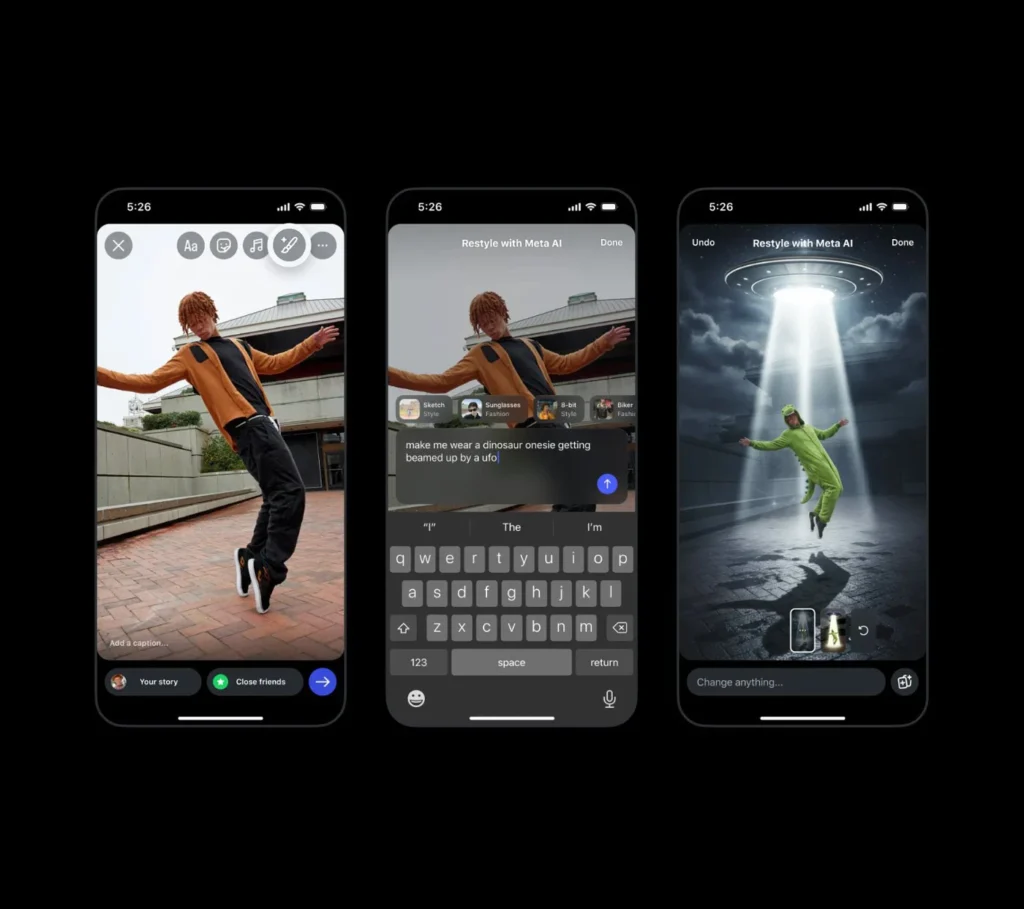
Whether you want to simply remove an unwanted detail from your story, include a playful element, change the vibe using a whimsical effect, or start a trend with your friends with Add Yours stickers, now you can. Restyle your photos and videos in Instagram Stories to make edits, big or small using Meta AI.
To restyle your photos:
• Click on the + on your profile photo to select an image from your camera roll to add to your story.
• After selecting your photo, click on the restyle icon in the top tray.
Make edits to your image by either:
• Choosing Add, Remove, or Change and then describing what you want to edit.
• Typing into the prompt bar at the bottom the edits you want.
• Scrolling to select one of the preset effects above the prompt bar.
• Clicking on the browser icon in the bottom right for even more preset effect options.
Once your new image is generated you can click “Done” before sharing your story.
To restyle your videos:
• Click on the + on your profile photo to select a video from your camera roll to add to your story.
• After selecting your video, click on the restyle icon in the top tray.
• Select a preset effect.
• Once your new video is generated you can click “Done” before sharing your story.
Here are some examples of ways people have enjoyed using restyle.
for further instraction and info please click this link.